 Quokra
Bot first. Human when it matters.
Quokra answers common questions instantly, then hands the chat to your team without losing a word. Add the chat to your site and the agent console to your dashboard, each with one script tag.
Self-hosted · Spring Boot + PostgreSQL · Works with any stack
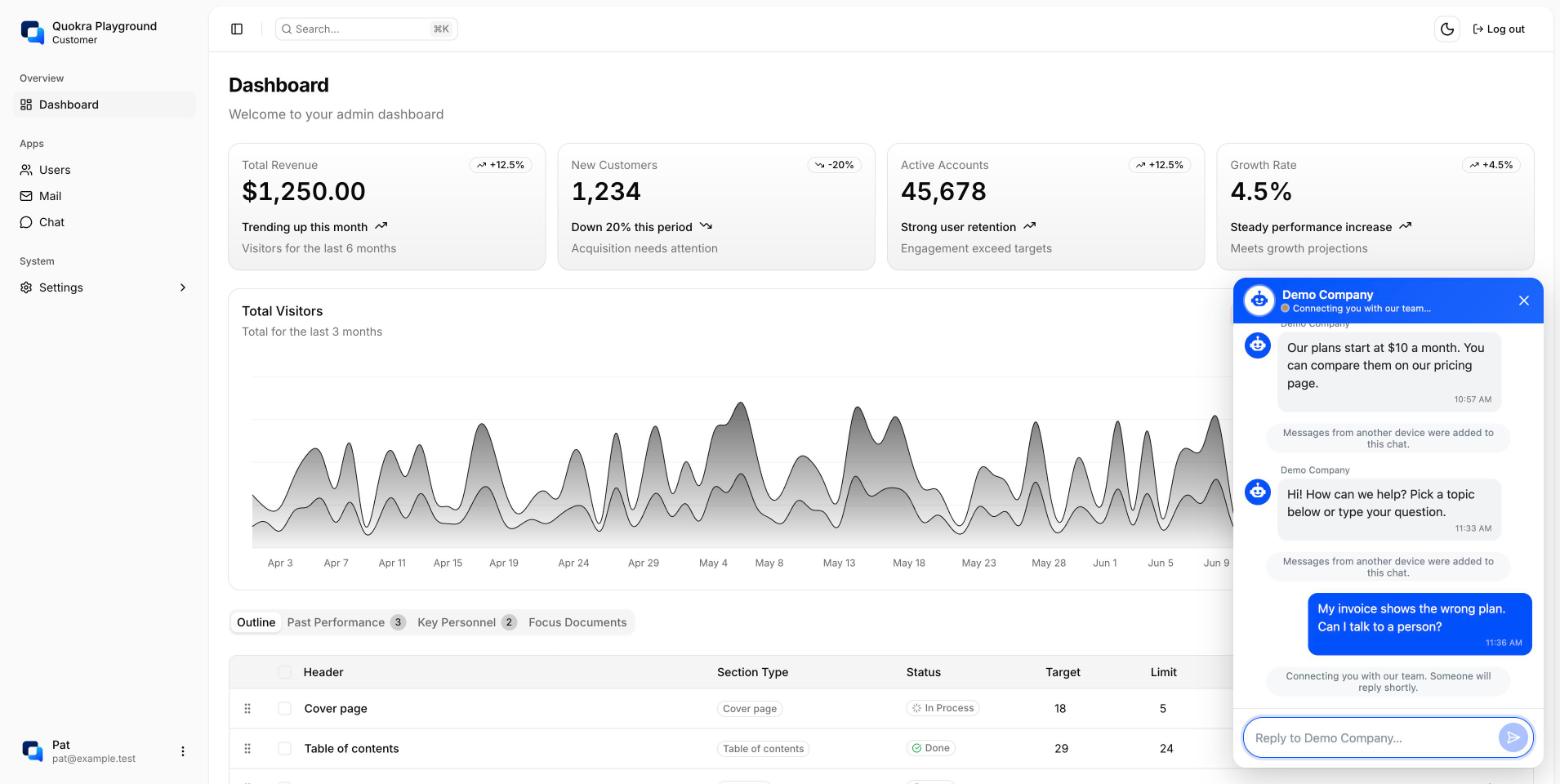
Answers first, from your FAQ
A menu and keywords per company. Common questions get an answer straight away, and urgent words go to the team.
- Bubble, inline panel or popup
- Your brand colour and wording, no code change
- Guests and logged-in customers
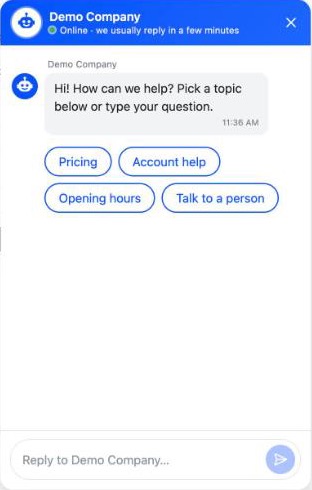
Hands off without losing a word
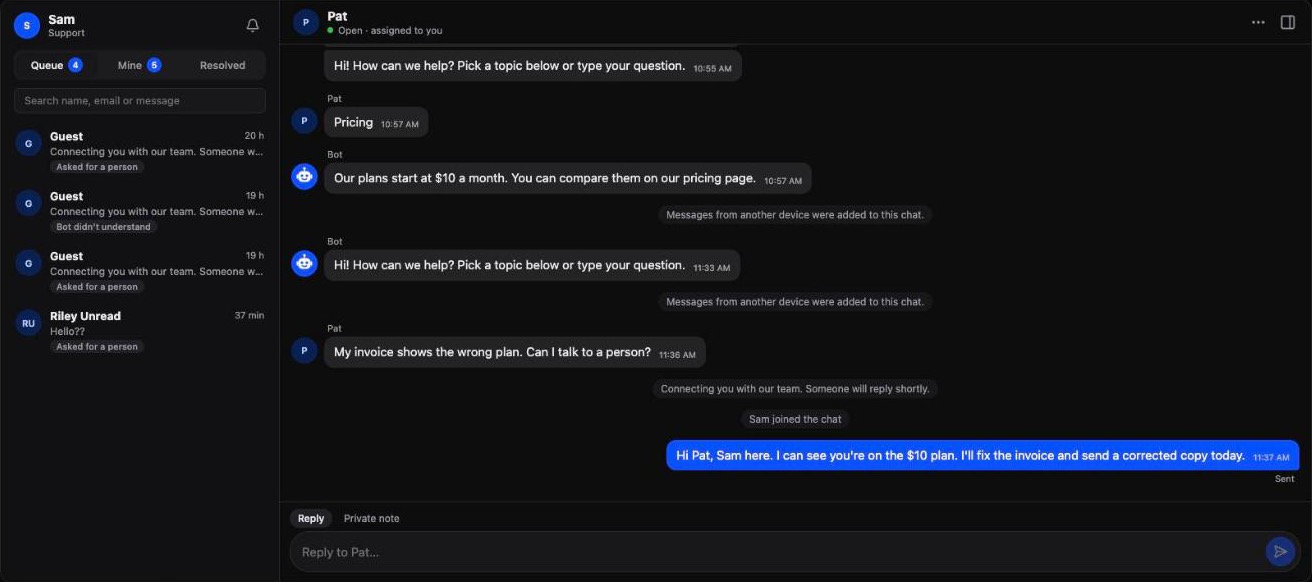
When the customer asks for a person, the bot doesn't understand twice, or an urgent keyword appears, the chat goes to your team's queue.
- Email and name collected in the chat for guests
- Logged-in customers keep one conversation across devices
- The agent sees the whole history
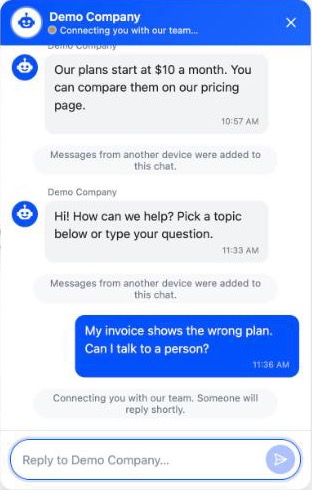
A console inside the dashboard your team already uses
Full page or a drawer from a floating button, signed in with your dashboard's own login. Queue, my chats and resolved lists, with unread counts and live updates.
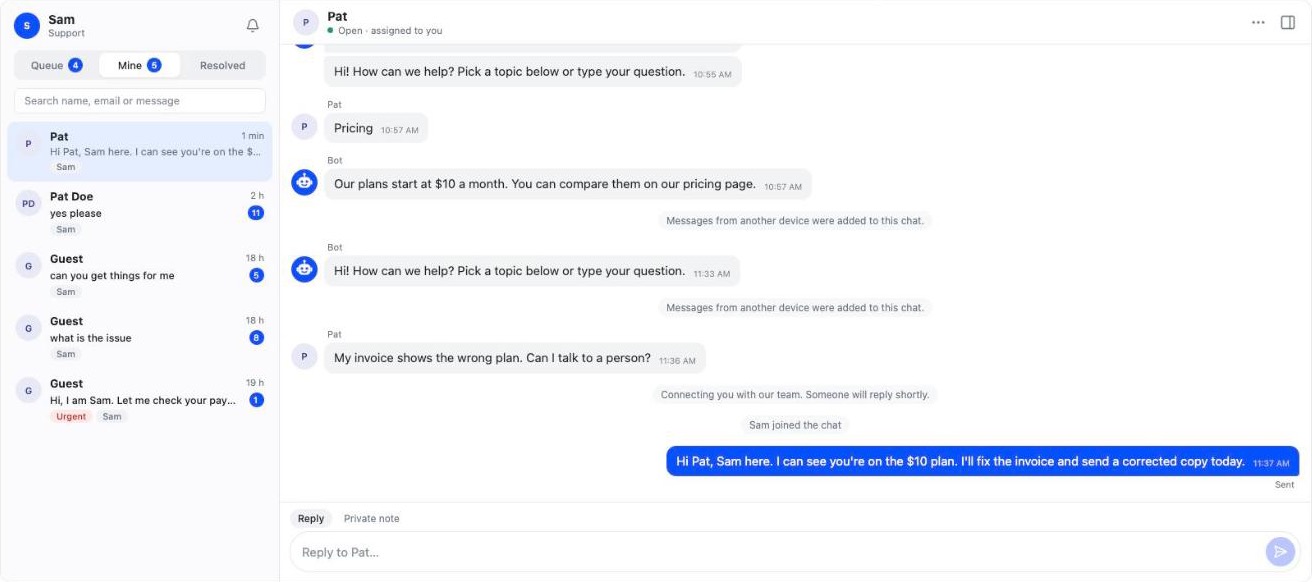
- Reply, which also accepts the chat
- Private notes for the team
- Transfer, return to the bot, resolve, reopen
- Search by name, email or message
- Block abusive contacts
- A sound for new chats
Looks like it belongs
Quokra follows your page's light or dark mode by itself, or a theme you choose, with your own accent colour.
- Light, dark or auto
- Per-company accent colour
- Bottom right or left, or inline in your page
How it works
- 1
A customer opens the chat
On your website: as a bubble, inline in the page, or as a popup.
- 2
The bot answers first
From your FAQ menu and keywords. Urgent words like “outage” go straight to the team, marked urgent.
- 3
“Talk to a person”
The bot asks for an email (and a name, which can be skipped) in the chat, then puts the conversation in your team's queue. Logged-in customers skip this step.
- 4
An agent takes over
From the console in your dashboard. They see the whole history and reply live.
Everything in v1
For your customers
- Chat bubble, inline panel or popup
- Instant answers from your FAQ
- Handoff to a person in the same chat
- Works across devices when they're logged in
- Follows your site's light or dark mode
For your team
- Console in your own dashboard, full page or drawer
- Queue, my chats and resolved lists with unread counts
- Search by name, email or message
- Reply, private notes, transfer, resolve, reopen
- Block abusive contacts
- New-chat sound and live updates
For developers
- One script tag, any stack
- Uses your existing login for agents (OIDC)
- Identify logged-in customers with a signed token
- JavaScript API and events
- REST and WebSocket API documented
Runs on your server
One Spring Boot app serves the API, the realtime connection, the bot and both UIs. Your data stays in your PostgreSQL.
- Server
- Spring Boot 4.1, Java 21
- Database
- PostgreSQL
- UI
- React + TypeScript (Vite)
- Realtime
- STOMP over WebSocket
Run it locally (needs Java 21+, Docker and pnpm):
cd web && pnpm install && pnpm build
cd ../server && ./mvnw spring-boot:run \
  -Dspring-boot.run.profiles=dev
# http://localhost:8080/console
The dev profile starts PostgreSQL with Docker Compose and loads a demo tenant.
Roadmap
Read the full plan- v1Now
FAQ bot + human handoff
- Customer chat and agent console via one script tag
- Left for v1: real agent login against an identity provider, tenant setup tooling, the Docker image
- v2Planned
Daily operations
- Canned replies, business hours and offline messages
- Attachments, browser notifications, FAQ editing in the console
- Standalone console login, more languages
- v3Planned
AI answers
- Answers grounded in your documents, with sources
- Summary for the agent on handoff
- v4Planned
Channels
- WhatsApp and email
- Identity-verified lookups via your backend
- v5Later
Platform
- Tenant self-service, analytics and CSAT
- Public release
Questions
Something else? Open an issue.
Try both sides
Sign in as a customer to chat with support, or as Sam or Alex to answer from the Support page. Open one in a private window to watch it happen live.